
Dia Arc Comet Chrome: My Take on Modern Browsers
I always play with new technology, and today’s new and exciting technology is... web browsers.
There are two big-deal AI races going on:
1. OpenAI, Anthropic, Google (...and Grok?), are competing to become the default consumer chat interface. OpenAI is winning this one.
2. Perplexity, Atlassian (...and Google?) are vying for control of the software portal through which we do nearly everything of interest on our computers: email, calendars, shopping, social media.
Two or three years ago I started using Arc, which flipped the browser sideways by putting the tabs on the side. But a few weeks ago I downloaded Comet, the new browser from Perplexity, which promises to make the browser "agentic" and allow me to use natural language to write emails, perform complex shopping searches, and anything else I can think to ask it.
The company behind Arc, which is now being acquired by Atlassian for $610m, recently launched their own agentic browser called Dia. Why didn't they just build the AI agent features into their existing and popular browser? Beats me. But they've allowed me to use the beta of the agentic browser since I have an account with Arc.
Let me start with what Arc is like. In a classic browser interface, you have a browser window that reflects your profile. Within that profile you're logged in to certain accounts, and so forth. You may build up tabs across the top of your browser, which then shrink, pixel by pixel, into icons as the accumulate. Switching profiles — staying logged in to different accounts — would require keeping multiple browser windows open.
Arc flipped this concept around and to my mind made it much more useful. You work in one browser window, and that window has within in "spaces", much like the MacOS lets you swipe right or left to new desktop screens. The different spaces in Arc can be different profiles, so you can swipe left or right to switch into a different set of accounts. Since I juggle a set of accounts for Dent, for Alsop Louie, and for TK Ventures, this makes jumping between these contexts much easier.
Instead of letting tabs build up on top of the browser, there's a "tray" on the left side of the browser that holds both your bookmarks and your tabs. Bookmarks are useful to me in Arc for the first time! They look and act like tabs that were just already there. Since they stack vertically, they never become pixel-width, forcing me to guess which is what. I love it.

After years with Arc’s unique interface, I have become dependent on it and I find it hard to imagine returning to traditional tabs and windows.
Neither Comet nor (disappointingly) Dia employ the same sidebar system. Since both browsers are built on top of Chrome, the closest I can find is the native tab group feature, which allows me to expand and collapse a collection of tabs.
So the question in my mind is: are the agentic features useful enough that I can switch away from Arc as my primary browser?
There are all kinds of things that I can imagine using an agentic browser for: grabbing timed-entry permits for a national park, filling out very annoying doodle forms, parsing data from my email and getting it into a different tab or system. But the agentic features in Comet are hit-or-miss so far, and in Dia they seem to be more or less absent.
Here are a few examples of things that I’ve tried.
Let’s try to use the action bar to do something like bring up my Airtable CRM:
Comet - Airtable CRM -- Success - Watch Video

Dia - Airtable -- Failure - Watch Video

What about using the browser to capture some contact information from my email and add it to the CRM?
Dia - Adding to CRM -- Failure - Watch Video

Comet -- Adding to CRM -- Partial Success - Watch Video

You can immediately see the difference between Comet and Dia: Comet is designed to act on and between open web pages as though you were driving the browser, whereas Dia is focused on giving you the ability to interact with the content that is open in your tabs. In fact, you don’t really need to play with the browsers to see the difference. It’s right in the taglines for each:
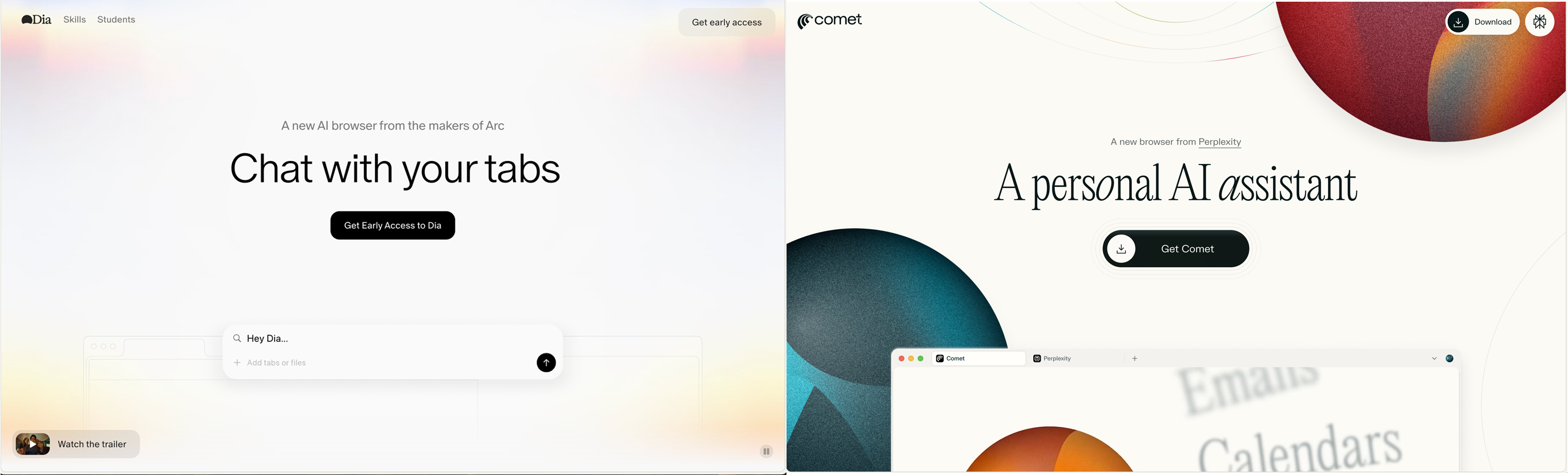
Comet
The Comet interface reminds me of Browser-Use, which I used for a while to try to book tennis courts and do other basic automated web research on things like travel details.
The ability for the browser to pull something from my email, interpret it, and take some action in a CRM or other service is the most compelling to me so far. Why do I want to use my browser for email when I could use Superhuman? I don't! Except it's the only way to get this kind of AI-enabled value from my email. But it foreshadows what agentic AI could do if Microsoft or Apple can figure out how to build it into the operating system.
Some of the things that Comet can do seem like magic to me. It's very cool.
I was halfway through building a process in n8n to take information from my email and add it to Airtable when I first tried it in Comet. After I saw that Comet could do it, I bailed on developing the workflow in n8n.
Dia
I can't really figure out what Dia is good for. I spent a while looking through the “skills” directory that they give you access to, and the list is pedestrian: summarize, explain, copy edit, recap, diagram.
These amount to either enhanced search bar functionality, which I can get by using Perplexity as my default search in a regular browser, or the ability to summarize something that's on the page, which I rarely want to do.
The bigger surprise, perhaps, is that after a few weeks I miss the Arc interface more than I enjoy the AI features of either new browser. But the days are early for agentic browsers, and it would be idiocy to rule anyone out of the race yet. So I’ve switched my default browser to Comet, and I’m going to give it a shot for a while longer.